Loyalty Program Setup
Turn on your loyalty program, set how guests earn points and how much each point is worth, and add bonuses and tiers that keep guests coming back.
Open the Loyalty Page
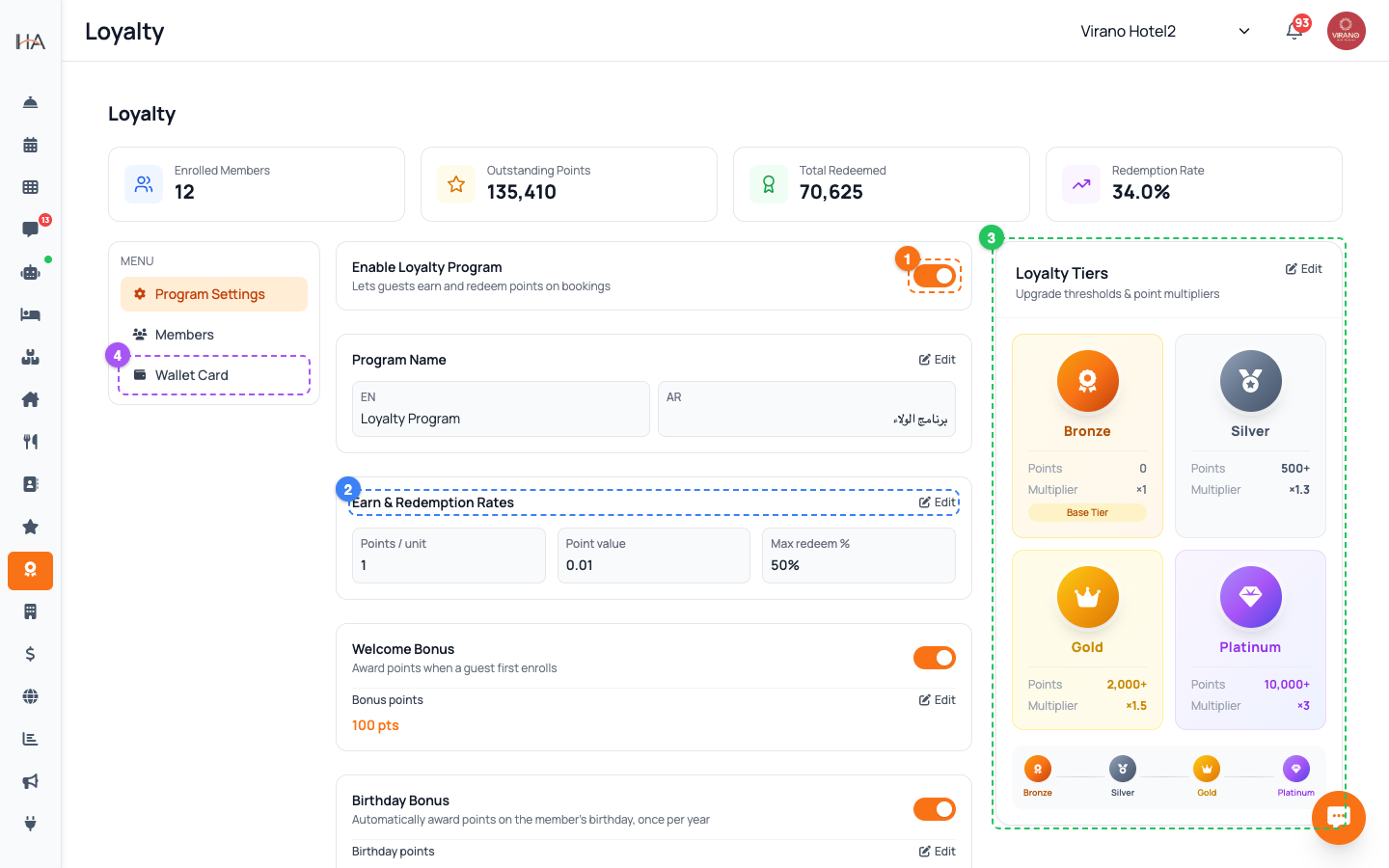
Click Loyalty in the left sidebar. At the top you will see summary stat cards (members, points outstanding, and more). Down the side is a small menu with three tabs: - Program Settings — the rules of your program (this article) - Members — the list of enrolled guests and their points - Wallet Card — design the digital card guests add to their phone Make sure the right property is selected at the top of the dashboard, because each property has its own loyalty program. Click Program Settings to begin setting it up.
Enable the Program and Name It
At the top of Program Settings, switch on Enable Loyalty Program. This lets guests earn and redeem points on bookings. While it is off, no points are awarded. Next, set the Program Name (for example "Hostel Rewards" or your brand's club name). This name appears to guests on their loyalty card and in messages, so make it inviting. After making any change on this page, remember to click the Save button at the top or bottom of the panel. Until you save, your new rules are not yet active.
Set Earning and Redemption Rates
In the Earn & Redemption Rates section, set three numbers that define how the program works: - Points per currency unit — how many points a guest earns for each 1 of your currency spent (for example 1 point per 1 SAR) - Point value (currency) — what one point is worth when redeemed (for example 0.01 means 100 points = 1 SAR) - Max redemption % — the most of a booking's price that points can cover (for example 50%) Together these decide how generous the program is. A small live summary shows the current values so you can sanity-check the math before saving.
Add Bonuses to Boost Engagement
Below the rates you can switch on extra bonuses: - Welcome Bonus — award a set number of bonus points when a guest first enrolls - Birthday Bonus — automatically give points on the member's birthday once a year. You can choose how many days before the birthday to send it - Direct-Booking Bonus — apply a points multiplier when a guest books directly with you instead of through a travel site, rewarding the bookings that cost you the least commission Turn on each one with its toggle, then enter the points or multiplier. These small extras make the program feel rewarding and nudge guests toward direct bookings.
Set Expiry and Terms
A few more controls keep the program healthy: - Points expiry (days) — how long points last before they expire (for example 365 days). This encourages guests to return and use them - Terms & Conditions — write the rules guests agree to; they appear with the program Fill these in your language and they display to guests automatically. Clear terms and a sensible expiry keep the program fair and predictable.
Choose Who Can Enroll (Targeting) and Add Tiers
Use Enrollment Targeting to decide which guests join automatically: - All Sources — every guest can earn points, no matter how they booked - Selected Sources — only guests from sources you tick (for example Direct Booking, AI Agents, OTA/Channel Manager). Quick presets like "Direct Only" or "OTA Only" make this fast Then, under Loyalty Tiers, create levels such as Silver and Gold, each with an upgrade threshold and a points multiplier. Higher tiers reward your most loyal guests with faster earning. Save when done.
Manage Members After Launch
Once the program is live, switch to the Members tab to manage enrolled guests. There you can: - Search the full list of members and see each guest's point balance - Manually enroll a guest who booked offline - Adjust points up or down (for example a goodwill bonus or a correction) - Edit a member's details or remove them The stat cards at the top of the Loyalty page update as members earn and redeem, giving you a quick health check of the program at any time.
More in Marketing & Loyalty
Marketing Hub — Your Growth Toolkit
A guided tour of everything in the Marketing area: WhatsApp campaigns, discount coupons, the loyalty program, and guest reviews — and where to find each tool.
WhatsApp & Direct Campaigns
Build a target audience, write a message or pick an approved template, schedule it, and send a WhatsApp campaign to your guests.
Coupons & Discount Codes
Create percentage or fixed-amount discount codes, set their validity dates and usage limits, restrict them to certain units, and track how often they are used.
Apple & Google Wallet Loyalty Cards
Design a branded digital loyalty card that guests add to their Apple or Google Wallet, with points that update live on their phone every time their balance changes.
Reviews Management
See every rating and comment guests leave after their stay or housekeeping service, filter and sort them, and use the feedback to lift your ratings and win repeat bookings.