Marketing Hub — Your Growth Toolkit
A guided tour of everything in the Marketing area: WhatsApp campaigns, discount coupons, the loyalty program, and guest reviews — and where to find each tool.
Open the Marketing Hub
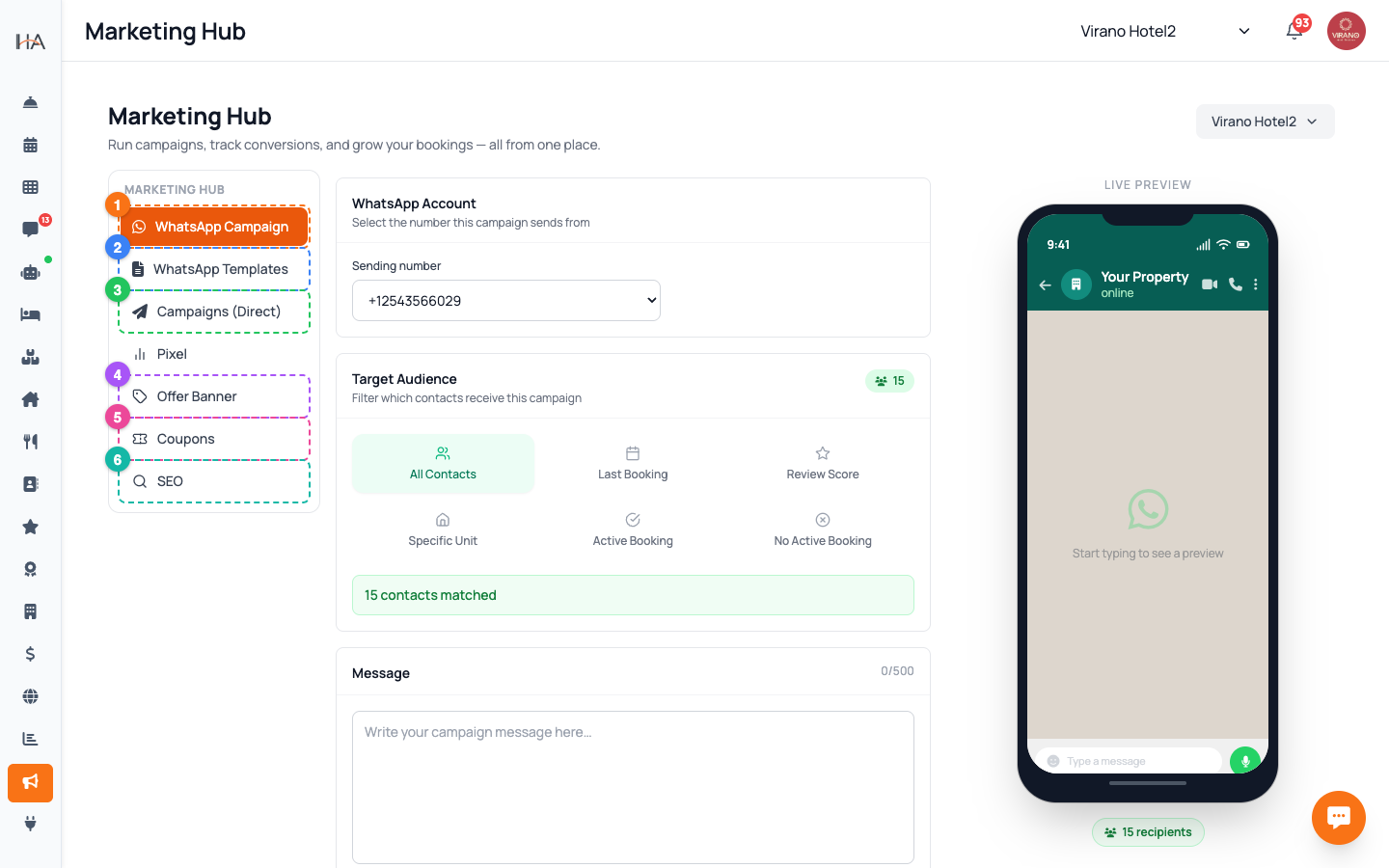
From the left sidebar, click Marketing to open the Marketing Hub. Inside you will see a column of tabs down the side that group your tools: - WhatsApp Campaign — send a broadcast message to your contacts - WhatsApp Templates — your pre-approved message templates (shown only when your number is connected directly) - Campaigns (Direct) — send using your own approved templates - Pixel — connect ad tracking pixels (Meta, Snapchat, TikTok, X) - Offer Banner — show a promo banner on your booking website - Coupons — create discount codes - SEO — improve how your site appears on Google Click any tab to switch to that tool. The Hub remembers the last tab you used.
Pick the Right Property First
Most marketing tools work per property group. Before you create anything, use the property selector at the top of the dashboard to choose which property you are working on (for example a hotel or an apartment group). Why this matters: - Coupons, the loyalty program, and the offer banner all belong to the selected property - Campaign audiences are built from the contacts of that property - Reviews can be filtered later, but it is cleaner to start in the right place If a tool tells you to "select a group", it simply means you are on "All" — switch to a single property and the tool will load.
Reach Guests with WhatsApp Campaigns
The WhatsApp Campaign tab is your main outreach tool. In one screen you: 1. Choose the WhatsApp number you send from 2. Build a target audience using filters (all contacts, last booking, review score, a specific unit, active or no active booking) 3. Write your message and attach an optional image or file 4. Pick a send date and time, then review the matched recipient count 5. Press the green Send button A live phone preview on the right shows exactly how your message will look. Use this for seasonal offers, last-minute deals, or thank-you notes after checkout.
Drive Direct Bookings with Coupons
Open the Coupons tab to create discount codes guests enter at checkout on your booking website. Each coupon can be: - A percentage off (for example 10%) or a fixed amount off - Limited by total uses and uses per customer - Restricted to a date range, a minimum booking amount, certain units, or first-time guests only Coupons are perfect for promo campaigns: create the code here, then announce it in a WhatsApp campaign or on your social media. The Coupons list shows live usage so you can see how popular each code is.
Reward Repeat Guests with Loyalty
The Loyalty program lives on its own page (click Loyalty in the sidebar). It lets guests earn points on every booking and redeem them for discounts on future stays. You can: - Turn the program on and set how many points are earned per currency unit - Add a welcome bonus, birthday bonus, and direct-booking bonus - Create membership tiers (for example Silver, Gold) with bigger rewards - Issue digital loyalty cards guests add to their Apple or Google Wallet Loyalty turns one-time guests into regulars and encourages them to book directly with you instead of through a travel site.
Listen to Guests through Reviews
The Reviews page (click Reviews in the sidebar) collects feedback guests leave after their stay and after housekeeping service. At a glance you see: - Your Average Rating out of 5 - Your Total Reviews count - A full list you can filter by property, unit, and source, and sort by date or rating Reviews are the heartbeat of your reputation. High ratings can be promoted in campaigns, while low ratings point you to problems to fix. Each review links straight to the related booking so you can follow up with the guest.
A Suggested Marketing Routine
Tie the tools together with a simple rhythm: 1. Weekly — open Reviews, reply to or follow up on any low rating, and note guest names with great feedback 2. Monthly — create a Coupon for a seasonal promotion 3. Then — announce that coupon in a WhatsApp Campaign to a targeted audience 4. Ongoing — keep the Loyalty program on so every booking quietly earns points and brings guests back 5. Quarterly — check the SEO and Pixel tabs so your ads and Google presence stay healthy Small, consistent actions in the Marketing Hub compound into more direct bookings over time.
More in Marketing & Loyalty
WhatsApp & Direct Campaigns
Build a target audience, write a message or pick an approved template, schedule it, and send a WhatsApp campaign to your guests.
Coupons & Discount Codes
Create percentage or fixed-amount discount codes, set their validity dates and usage limits, restrict them to certain units, and track how often they are used.
Loyalty Program Setup
Turn on your loyalty program, set how guests earn points and how much each point is worth, and add bonuses and tiers that keep guests coming back.
Apple & Google Wallet Loyalty Cards
Design a branded digital loyalty card that guests add to their Apple or Google Wallet, with points that update live on their phone every time their balance changes.
Reviews Management
See every rating and comment guests leave after their stay or housekeeping service, filter and sort them, and use the feedback to lift your ratings and win repeat bookings.